
Information
Category Name: Deadbox Forensics
Files: Laptop-Deadbox.zip 5.0 GB
My Recommendations
Defcon2019:
Download it from the CTF and verify the file with md5:
md5sum /path/to/Laptop-Deadbox.zip
MD5: 5e35e01cfb14bd3762e7e3e5228cbb37
After verification, extract the zip archive and share the folder with your VM.
This my cheatsheet to mount NTFS E01 images in Linux, and this is my cheatsheet to mount the second partition.
This is my personal preference, I like being organized and deleting a folder when I’m done with it .
mkdir Documents/defcon19/deadbox && cd Documents/defcon19/deadbox
A question asks for a MD5 hash, so it’s best to create a hashset database in advance, as the process takes a long time. You can leave it running in the background and work through the questions while it runs.
sudo tsk_loaddb -h -d deadbox.db /mnt/ewf/ewf1I prefer to copy files/directories that I will be working on a lot. Like this, if I mess it up, I can delete it and copy it again.
cp -r /mnt/Windows/Windows/System32/config . These four tools are all you need to solve this challenge, make sure they are installed and running properly.
##sleuthkit test with:mmls -h
##regripper test with:rip.pl -h
##pffexportpffexport -h##html2texthtml2text -help
Walkthrough
1. Hello, my name is... - 1 pts
What is the name of the examiner who created the E01?
Encase files always contain a text file about the Case Information:
cat /mnt/hgfs/Horcrux/Horcrux.E01.txt

2. Who owns it? - 1 pts
What is the username of the primary user of the machine?
The fastest way is to list the Users directory of the mounted partition:
ls -la /mnt/Windows/Users

Answer: flag<Karen>
3. Does it match? - 1 pts
What is the SHA1 hash of the evidence?
Using the same file as Question 1:

Answer: flag<0fa6ab4bd9a707d49ded70e8b9198fe18114b369>
4. The Big Bang - 1 pts
What time was the image created? Submit in UTC as MM/DD/YYYY HH:MM:SS in 24 format.
Using the same file as Question 1:

We need UTC, to see if there are timezone changes, use Exiftool on the image:

exiftool /mnt/hgfs/Horcrux/Horcrux.E01

To get to UTC, we need to add four hours to the Acquisition time in the figure above. In UTC, the image was created on Saturday March 23 00:08:08 2019.
Answer: flag<03/23/2019 00:08:08>
5. Which window is it? – 5 pts
What OS is installed on this computer? Windows ____
Using RegRipper:
rip.pl -p winver -r config/SOFTWARE

Answer: flag<10>
6. The worst thing about prison were the dementors! – 5 pts
There appears to be a theme used when creating the E01. What is the theme? (Case Sensitive, two words)
Horcrux, Voldemort references in the Notes, dementors in the title… Easy for a massive fan ☺️
Answer:flag<Harry Potter>
7. Brooms aren’t just for sweeping – 5 pts
What is the decoded name of the Evidence File?
The Acquisition Details from Question 1, the Description is: Lbh’er n jvmneq Uneel! There’s a gentle pattern with ROT13, so I copy/paste to CyberChef and select ROT13:

8. Russia – 10 pts
What is the hostname of the Windows partition?
Using RegRipper:
rip.pl -p compname -r config/SYSTEM

9. Let’s chat – 10 pts
A messaging platform was used to communicate with a fellow Alpaca enthusiest, what is the name of the software?
Listing Karen’s AppData to see what kind of softwares she may have installed:
ls -la /mnt/Windows/Users/Karen/AppData/*/

The only messaging platform is Skype.
10. Zippy Zip – 15 pts
What is the zipcode of Karen’s craigslist post?
grep -r 'craigslist' /mnt/Windows/Users/Karen/AppData/*/
Displays Chrome artifacts, copy the History database to the WD:
cp '/mnt/Windows/Users/Karen/AppData/Local/Google/Chrome/User Data/Default/History' History.db && sqlitebrowser History.db
Open the urls table and filter with craigslist, the last record (id 74) has a zipcode:

Answer:flag<19709>
11. New email, who dis? – 15 pts
What are the initials of the person who contacted Karen?
Given the question, the flag should be stored in a pst/ost file. Only one file is found so copy it to the WD and extract it using pffexport:
find /mnt/Windows/Users/Karen/AppData -type f -name "*.ost" -o -name "*.pst"
cp /mnt/Windows/Users/Karen/AppData/Local/Microsoft/Outlook/klovespizza@outlook.com.ost klovespizza.ost
pffexport klovespizza.ost
The output is well organized and messages are stored in html files. First, I cd into the exports directory to make the commands easier. To print all the messages as text, and skim through them we can use html2text:
cd 'klovespizza.ost.export/Root - Mailbox'
html2text IPM_SUBTREE/Inbox/*/*.html

The message in Message00007 is an email from M.S. working for TAAUSAI, whom is offering Karen a job!
12. Make it rain! – 15 pts
How much money was TAAUSAI willing to pay Karen upfront? Answer without commas or dollar signs.
In the email above, M.S. is offering $150,000 USD upfront.
Answer:flag<150000>
13. You have no idea how high I can fly - 15 pts
What country is Karen meeting the hacker group in?
html2text IPM_SUBTREE/Inbox/*/*.html | grep "Meet"

To double check, I grep the entire directory for the coordinates, and the email is indeed from taausai!
The coordinates are :“27°22’50.10″N, 33°37’54.62″E”

After that, I cd back into the working directory for this section:
cd ..
cd ..
Answer: flag<Egypt>
14. Where in the world is Carmen Sandiego? - 15 pts
What is the timezone? (Use the three letter abbreviation)
Using RegRipper:
rip.pl -p timezone -r config/SYSTEM

Answer: flag<UTC>
15. Someone actually read that? - 15 pts
What is the Last Accessed time for AlpacaCare.docx? Submit in UTC as MM/DD/YYYY HH:MM:SS in 24 format
To find this type of information, it’s best to use the Sleuth-Kit’s ifind and istat, as it will find the file and display its metadata.
sudo ifind -n AlpacaCare.docx -o 1126400 /mnt/ewf/ewf1
sudo ifind -n AlpacaCare.docx -o 67106816 /mnt/ewf1/ewf1
First, I look at the main partition, and it doesn’t find the file. However, the file is found on the second partition:

Using istat to display the file’s metadata:
sudo istat -o 67106816 /mnt/ewf1/ewf1 49

The last Accessed time is: 2019-03-17 17:52:20 EDT. In UTC, that’s +4 hours: 2019-03-17 21:52:20.
Answer:flag<03/17/2019 21:52:20>
16. Partition Suspicion - 20 pts
Karen had a second partition on the drive, what drive letter was it assigned?
Using RegRipper:
rip.pl -p mountdev2 -r config/SYSTEM
The DosDevices\C: is the main partition. The other partition is assigned the drive letter A.

Answer: flag<A>
17. You've got questions? I've got answers - 20 pts
What is the answer to the question Michael’s manager asks Karen?
Back to the emails, first we cd into the export directory (it just makes running the commands easier). Searching for question has no meaningful results, but answer does!
cd 'klovespizza.ost.export/Root - Mailbox'
html2text IPM_SUBTREE/Inbox/*/*.html | grep "question"
html2text IPM_SUBTREE/Inbox/*/*.html | grep "answer"

Answer: flag<TheCardCriesNoMore>
18. Recruit Pursuit - 20 pts
What job is Karen told she is being considered for? Answer should be submitted with no spaces and all lowercase.
First, I look for the word job in the exported emails:
html2text IPM_SUBTREE/Inbox/*/*.html | grep "job"

There is a result but it is not printed completely, so it’s best to search for the fragmented string directly.
grep -r 'job position we think' IPM_SUBTREE
The job offer is entry level cyber security analysts:

##Going back to my main Working Directory
cd ..
cd ..
Answer: flag<cybersecurityanalysts>
19. Oh, you're not supposed to use the same password for everything...? - 20 pts
When was Karens password last changed? Submit in UTC as MM:DD:YYYY HH:MM:YYYY in 24 format
rip.pl -p samparse -r config/SAM
The output is kind of large, eventually you will find this:

Answer: flag<03/21/2019 19:13:09>
20. Are you sure you want to change your default browser? - 20 pts
What Version of Chrome is installed on the machine?
ls -la '/mnt/Windows/Program Files (x86)/Google/Chrome/Application/'

Answer: flag<72.0.3626.121>
21. iS tHiS sP@M? - 22 pts
Karen received a reply to her craigslist ad from a fellow Alpaca enthusiast, what is the email address associated with this reply?
First, cd into the mail exports directory, then using html2text, skim through the emails:
cd 'klovespizza.ost.export/Root - Mailbox'
html2text IPM_SUBTREE/Inbox/*/*.html
The first email Karen received from TAAUSAI was Message00004:

Craigslist replies are sent with an email from the craigslist domain, so we can grep for Craigslist in the Internet Headers file for this message:
grep -r 'craigslist' IPM_SUBTREE/Inbox/Message00004/InternetHeaders.txt

Answer: flag<7066d7539fdf30529e2e43ba5fd21606@reply.craigslist.org>
22. Moooooooooo - 30 pts
What is the tool Karen hopes to learn to use? This question is case sensitive.
grep -r -l "learn" /mnt/Windows/Users/Karen
This returns mostly Chrome/Skype artifacts and two text files in DuanesChallenge on Karen’s desktop. The History database has an entry for “learn about alpacas”. The Skype log file and the text files in DuanesChallenge do not contain relevant artifacts. We can look in the Second Partition, as it had several files:
grep -r "learn" /mnt/Windows2
##Returns Binary file /mnt/Windows1/AlpacaCare.docx matches - copy it to the WD
cp /mnt/Windows2/AlpacaCare.docx AlpacaCare.docx
unzip AlpacaCare.docx -d alpaca
Since .docx files are like zipfiles, I like unzipping them to see if there’s hidden files. In CTFs its a common task!
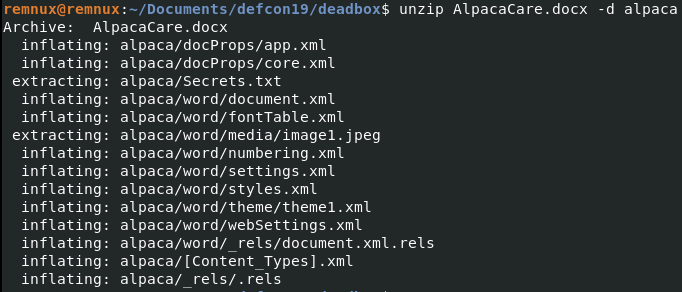
A Secrets.txt file right inside the word file! Looking at its contents:
cat alpaca/Secrets.txt

Answer: flag<BeEF>
23. She's a ladies man - 30 pts
What was the volume name of the second partition on the laptop?
Using Sleuth-Kit’s fsstat on the second partition will show the general details about the filesystem:
sudo fsstat -o 67106816 /mnt/ewf1/ewf1

You could also use RegRipper, as we know that the second partition’s drive letter is A:
rip.pl -p volinfocache -r config/SOFTWARE

Answer: flag<PacaLady>
24. now with 99% more ads - 30 pts
What is the HostUrl of Skype?
This took me a long time in CLI, in Autopsy the HostUrl would be automatically displayed!
Skype was downloaded from Chrome, we can check the History database to find its associated Urls.
sqlitebrowser History.db
In the Downloads Table, filter with current_path with Skype:

We get the referrer URL, the tab_url and the tab_referrer url.
The downloads_url_chains table provides more information about a download. Filter the id with 7 (which is the download id for Skype):

chain_index is basically the order in which redirection to the download file occurs. The last one is the actual url of the .exe file, aka its “HostUrl”:
Answer:flag<=https://download.skype.com/s4l/download/win/Skype-8.41.0.54.exe>
Looking at previous writeups, you needed to include the “=” before the link (?).
25. her name is snow - 35 pts
Bob told Karen the name of his favorite Alpaca. What is the name?
To answer other email-related questions, I had to read some of the messages, and I remember an email about a conversation with Bob. Karen provided a password in the email, meaning she must have attached a password-protected file with the conversation. To retrieve it:
cd 'klovespizza.ost.export/Root - Mailbox'
html2text IPM_SUBTREE/Inbox/*/*.html | grep "password"
To find which email could have the conversation, grep for “password” in the entire directory:
grep -r -l "password"

Now, we list the Attachment sub-directory of the messages:
ls -la 'IPM_SUBTREE/Sent Items/Message00010/Attachments'
ls -la 'IPM_SUBTREE/Sent Items/Message00009/Attachments'
Both have a Skype Convo.zip file. I copy it to my WD and unzip it:
##Going back to WD before
cd ..
cd ..
cp 'klovespizza.ost.export/Root - Mailbox/IPM_SUBTREE/Sent Items/Message00010/Attachments/1_Skype Convo.zip' skype.zip
unzip skype.zip -d skype
##password input pacalove
cat 'skype/Skype Convo.txt'
This is the contents of their conversation:

The encrypted name is: MFDfMiTfMyHfMyHfMyj=. Best way to decode it is with Cyberchef. After playing around, this is the “Recipe” to decode it:

Rot1 + Base64 decode + Hex to Ascii = Jerry
Answer: flag<Jerry>
26. rev2md5 - 45 pts
Find the file with MD5 2BD8E82961FC29BBBCF0083D0811A9DB. It will lead you to victory.
Update: The link found from this file is no longer active. The flag has been updated to accept the full URL which the link points to. If you are having issues, please contact @ChampDFA on twitter.
If you followed my Recommendations, you should have the “deadbox.db” database in your WD. Open the database:
sqlitebrowser deadbox.db
In the tsk_files table, go to the md5 column and paste the hash:

There are two files with this entry – one is in Karen’s Recent directory and the other is in Tor. I prefer looking at the “original” file first. Copy it to the WD and strings it:
cp '/mnt/Windows/Users/Karen/Desktop/Tor Browser/Browser/sudormrf.url' sudormrf.url
strings sudormrf.url

27. AlpacaCare2020 - 75 pts
What is the domain name of the website Karen browsed on Alpaca care that the file AlpacaCare.docx is based on?
AlpacaCare.docx was copied to the WD. Open it to view its contents:
libreoffice AlpacaCare.docx
If you copy/paste the first paragraph into Google, it will return the domain name “alpacasofoklahoma.com”. However, if you scroll down the documents you will see this:

The text was reproduced with permission, and the Copyright at the bottom shows that Karen copied it from Palomino Alpaca Farm. The site doesn’t exist anymore, but the domain name used to be “palominoalapacafarm.com”.
Answer: flag<palominoalpacafarm>
28. You have secrets? - 75 pts
What is the Created Timestamp for the secret file? Submit in UTC as MM/DD/YYYY HH:MM:SS in 24 format.
Hint: Secrets are best kept hidden in plain sight.
exiftool alpaca/Secrets.txt
With Exiftool, the time is displayed in EDT:

In UTC, that’s + 4, so the file was created at 2019:04:25 08:23:46.
Answer: flag<03/25/2019 08:23:46>
29. DrDD - 150 pts
Duanes Challenge: Duane Dunston had his passwords hijacked. Karen hid them C:\Users\Karen\Desktop\DuanesChallenge somewhere, what is the password to Duane’s LinkedIn?
First, copy the folder into the WD and look at its contents:
cp -r /mnt/Windows/Users/Karen/Desktop/DuanesChallenge DuanesChallenge && cd DuanesChallenge
ls -la

There are many different file types. Searching for Linkedin, password, username has no results. If Karen had corrupted one of the Office Documents, the string would still match. A method to check for hidden files in pdfs is Exiftool, it will return a warning if the file is corrupt:
exiftool * | grep "Warning"
There are two warnings for pdf files:

Then, using strings to look at the contents of the file, there is a large base64 string at the bottom of “South_Carolina_Academic_Standards_and_Performance_Indicators_for_Science_2014.pdf”! A PDF file ends with %EOF, copy everything after %EOF until the equal sign and paste it into CyberChef. Select “From Base64” in Operations: decoded, there’s evidence it’s an XLSX file.
First, make sure the headers are correct. Select “To Hex”. The header of an xlsx file is 50 4B 03 04. It should start with ‘PK’ in strings form. In this case, delete everything before PK:
Now, save the output as: duanes.xlsx

Next, open the file with libreoffice or use xlsx2csv:
xlsx2csv duane.xlsx

Answer: flag<R33*D)DogHouse>


