
Information
Category Name: MacOS
Image: MacOS, which by my findings was imaged with Magnet Cyber Remote Agent.
The Mac Image was too big to unzip in my Virtual Machine, so I unzipped it in an external drive and shared the folder with my Virtual Machine (I am using VMware Fusion). If you are also using VMware Fusion, you need to install VMware tools to do that.
My Recommendations
This is my personal preference, I like being organized and deleting a folder when I’m done with it.
mkdir Documents/Magnet/mac && cd Documents/Magnet/macVerify the file with md5sum
md5sum /path/to/.zipWalkthrough
1. Call me by your name (5)
What is the Local Host Name of this device?
This is usually found at /Library/Preferences/SystemConfiguration/preferences.plist
cat /mnt/hgfs/stu-21-155-171-184-20210406-134216-files/Library/Preferences/SystemConfiguration/preferences.plist | grep "LocalHost" -B 1 -A 1
Answer: Elis-Mac-mini
2. I love it when you call me big sur (5)
What is the Product Build Version?
System Version is stored in the /System/Library/CoreServices/SystemVersion.plist property list.
cat /mnt/hgfs/stu-21-155-171-184-20210406-134216-files/System/Library/CoreServices/SystemVersion.plist
Answer: 20D74
3. Whose got your back(up)? (5)
What is the IMEI of the iOS device that is backed up?
Grepping for IMEI in the Users/eliflatt/Library directory (where Itunes Backup are stored), we get a match for the Info.plist of the backup:
grep -r "IMEI" /mnt/hgfs/stu-21-155-171-184-20210406-134216-files/Users/eliflatt/Library/
cat /mnt/hgfs/stu-21-155-171-184-20210406-134216-files/Users/eliflatt/Library/Application\ Support/MobileSync/Backup/518e8d766f9b3e76db216f35fdb6b0604e50f61b/Info.plist
Answer: 356759080486567
4. Bottoms up, and the devil laughs (10)
What is Eli’s preferred energy drink brand?
Well, in a normal scenario I would look through all possible files, but given that the next question appears to be related to web, I feel like this is related to the Safari History database. There are no other web browsers installed, I know this because I ran:
ls -la /mnt/hgfs/stu-21-155-171-184-20210406-134216-files/Users/eliflatt/Library/Application\ Support/
If there was an other browser, its name would come up here. It is possible Eli had another browser installed, uninstalled it, and deleted all traces of it. There would be ways of finding this evidence. However, in this case he was using Apple’s default Safari Browser. Its juiciest files are stored in /Users//Library/Safari, the juiciest of all being “History.db”.
Since I mounted my file as read-only I need to copy the database to my system before opening it:
cp /mnt/hgfs/stu-21-155-171-184-20210406-134216-files/Users/eliflatt/Library/Safari/History.db History.db
sqlitebrowser History.db
No need to check if “bang energy” is a drink as the Amazon.com title confirms it is a caffeinated energy drink.
Answer: bang energy
5. LaxBro (10)
Which college lacrosse team schedule did Eli often look at?
In the Safari/History.db database, there are multiple entries for both PLL cannons and Ualbany. Ualbany stands for University at Albany.
Answer: UAlbany
6. Stop playing with me (10)
How many websites have permissions to autoplay?
This information is stored in the SitesAllowedToAutoplay.plist property list, in the same directory as the previous questions.
cat /mnt/hgfs/stu-21-155-171-184-20210406-134216-files/Users/eliflatt/Library/Safari/SitesAllowedToAutoplay.plist
It is in binary format, so we convert it to xml using plistutil:
plistutil -i /mnt/hgfs/stu-21-155-171-184-20210406-134216-files/Users/eliflatt/Library/Safari/SitesAllowedToAutoplay.plist -o auto.plist
Printing the auto.plist file doesn’t gives us any numbers, but the .plist structure is domain.
‘<string>’ occurs only before the domain name, so I can redirect the output of grep to wc to count the number of times string appears:
grep -o '' auto.plist | wc -l
Answer: 165
7. Finder’s Keepers (25)
What Source Version is the Finder app on this device?
Finder is stored in the Core Services of the System Directory. MacOS Apps are technically a folder, and all of them contain a folder “Contents” which is where the App’s binaries and information is stored.
ls -la /mnt/hgfs/stu-21-155-171-184-20210406-134216-files/System/Library/CoreServices/Finder.app/Contents
cat /mnt/hgfs/stu-21-155-171-184-20210406-134216-files/System/Library/CoreServices/Finder.app/Contents/version.plist
Answer: 1350002010000000
8. it’s ra1ning it’s pouring (25)
What is the size in bytes of the application found within Eli’s trash?
Fun Fact: A lot of directories and files are hidden in MacOS/iOS. Usually, the file/folder/directory name starts with a “.”, but not always. If you own a Mac, you can see those files by pressing Command, Shift and . (dot) at once. Lil advice – don’t mess/play with those files!
ls -la /mnt/hgfs/stu-21-155-171-184-20210406-134216-files/Users/eliflatt/.Trash
The application in question is checkra1n, at its size in bytes is 9389392
Answer: 9389392
9. Oh Sheet! (25)
What is the name of the spreadsheet Eli often navigated to?
The way this question is termed gives a hint that the spreadsheet is something web-related. If we go back to History.db that we copied in our working directory, and go to the table “history_items”, sort visit_count by descending order.
The top site is: https://docs.google.com/spreadsheets/d/1uAv_iMnp0xt8Cn_NJqbk8zA1SPFjL3ddWWhRy8K0Gsc/edit#gid=0; which is the same spreadsheet from the Google Takeout and Chromebook data!
To confirm (just in case) we can find the spreadsheet name by going to the history_visits table and filtering the “history_item” column with the id of the url from “history_items” above (in this case it’s 77):
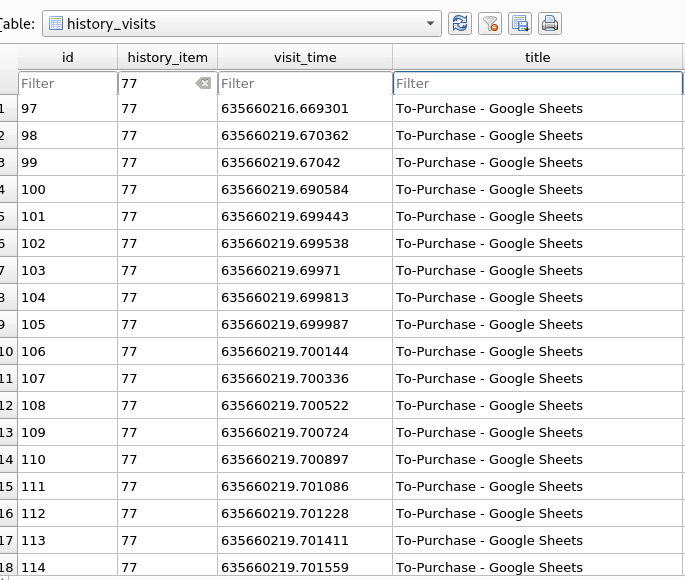
Answer: To-Purchase.xlsx
10. Remind me Later (25)
What time and date in EST did Eli add a notification permission on Safari? Answer in MM/DD/YYYY HH:MM:SS
I didn’t get the answer correctly 🙁
cat /mnt/hgfs/stu-21-155-171-184-20210406-134216-files/Users/eliflatt/Library/Safari/UserNotificationPermissions.plist
A binary .plist again 🙁 Convert it with plistutil
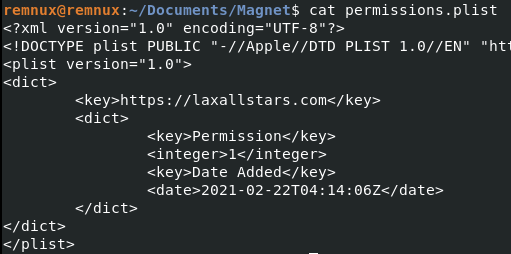
plistutil -i /mnt/hgfs/stu-21-155-171-184-20210406-134216-files/Users/eliflatt/Library/Safari/UserNotificationPermissions.plist -o permissions.plist
cat permissions.plist
The timestamp is: 2021-02-22 04:14:06. I tried converting it to EST from GMT but it didn’t work 🙁
Pls DM/Comment if you can help with this, can’t seem to convert the timestamps the right way 😩
UPDATE:
First, listing the contents of the Safari Directory:
ls -la /mnt/hgfs/stu-21-155-171-184-20210406-134216-files/Users/eliflatt/Library/Safari/
There is “UserNotificationPermissions.plist” and a “RemoteNotifications” folder.
Copying, converting and printing both files to my directory:
cp -r /mnt/hgfs/stu-21-155-171-184-20210406-134216-files/Users/eliflatt/Library/Safari/RemoteNotifications Remote/
cp /mnt/hgfs/stu-21-155-171-184-20210406-134216-files/Users/eliflatt/Library/Safari/UserNotificationPermissions.plist UserNotifications.plist
##Converting with plistutil
plistutil -i UserNotifications.plist -o UserNot.plist
plistutil -i Remote/Permissions.plist -o Remote.plist
##Priting
cat Usernot.plist
cat Remote.plist
It makes sense that my value of interest is the second one (RemoteNotifications/Permissions.plist) since the timestamp is 9 seconds before. The question is, in what timezone is the timestamp stored? The fact that the XML file prints the date as <date> makes me think that it is stored in Local Time.
I have no more tries left, but I’m assuming it’s stored as GMT. In February, EST is GMT -5.
GMT-5: 2021-02-21 23:13:57 OR GMT-5: 2021-02-21 23:14:06. Could be either to be honest, but since the question is *Eli* focused, I would probably go with the UserNotifications.plist – which is CORRECT! 😭
Answer: 02/21/2021 23:14:06
11. Secrets Secrets are no fun (50)
What is Eli’s system password hint?
Eli upgraded his OS from Catalina to Big Sur. When you upgrade your system on Mac, a Volume called “Preboot” is created, contains information about the APFS system. In Preboot there is a folder with a UUID, which contains the “var/db” folder containing important information about the User. I copy this folder into my Working directory:
cp -r /mnt/hgfs/stu-21-155-171-184-20210406-134216-files/System/Volumes/Preboot/943CAEE3-8306-426A-A65E-4E0F4B52EBDB/var/db db/
##Then Grep for Password:
grep "Password" db/* -A 1
Answer: Fix something!
12. There are no penguins at the North Pole (50)
What is the SHA1 hash of Eli’s profile picture on the device?
In Firefox, open two tabs with https://gchq.github.io/CyberChef/
In the first tab, open the CryptoUserInfo.plist located in the db folder. Copy everything from <data> (right under PictureData) all the way down to </data> (right above PictureFormat). Make sure you only copy the data between (example shown below):
Paste the content to the second tab of CyberChef. In the Second Tab, chose “From Base64” in the Operations Menu. Your output should look like weird spaced out strings.
Save the file as “User.Jpeg”.
In a new Terminal Window enter:
cd Downloads/
display User.jpeg
You should get a picture like this, of a penguin:
Calculate the SHA1:
sha1sum User.jpeg
Answer: 3cc4e757872a7a9c534ad42bffaa9f8170a99553
13. WallStreetBet You Can’t Get This One (50)
Eli searched for 4 stock quotes (not a web search). What was the second stock he searched for? answer in ticker form ex: $MVS
OMG this one was tough as I needed to do a bit of trial and error to understand how it works. Basically, you need to look for search entries in the cache data in User/Library/Containers/com.apple.stocks. Each stock the user searched for in the app is recorded in fsCachedData, and starts with {{“StockName”:{“query”:xxx, “created”: date}. We need to find the second stock he looked first, so let’s order the data by date/stock:
grep -r "query" /mnt/hgfs/stu-21-155-171-184-20210406-134216-files/Users/eliflatt/Library/Containers/com.apple.stocks/
This returns around 30 files matching. I manually found this data by copy/pasting into a text editor each line starting with the pattern: {{“StockName”:{“query”:xxx, “created”: date …} and sorted chronologically.
{“AAPL”:{“query”:{“count”:1.0,”created”:”2021-03-07T06:18:39Z” –> 1
{“SPCE”:{“query”:{“count”:1.0,”created”:”2021-03-07T06:20:01Z” –> 2
{“GME”:{“query”:{“count”:1.0,”created”:”2021-03-07T06:20:22Z”, –> 3
{“AMC”:{“query”:{“count”:1.0,”created”:”2021-03-07T06:21:06Z” –> 4
{“TSLA”:{“query”:{“count”:1.0,”created”:”2021-03-07T06:22:34Z” –> 5
{“AAPL”:{“query”:{“count”:1.0,”created”:”2021-03-07T06:45:41Z” –> 6s
Answer: $SPCE
14. Where are my keys!? (50)
What is the encryption-key for Eli’s iCloud (SHA256)?
DM me on Twitter/Comment if you can help 🥺
UPDATE
Not gonna lie, low key died of excitement when the one and only Stark4n6 replied to my desperate call for help on Twitter and gave me a hint:
“Check for a common keychain database file, let me know if you need more help. I’ll be publishing my writeups next week”
I had rabbit-holed into keychain-2.db but didn’t have time to get the right answer.
Copying & opening the keychain:
cp /mnt/hgfs/stu-21-155-171-184-20210406-134216-files/Users/eliflatt/Library/Keychains/*/keychain-2.db keychain-2.db
sqlitebrowser keychain-2.db
Going to the table “Keys”; and surprise… in the klbl column, a beautiful value:
encryption-key SHA256:fUpf9J+cLRI3OCJ/KdFpZoaZXgfj2DC3ZrQnW7XT9Os= – belonging to agrp – com.apple.security.egoIdentities.
No idea what egoIdentities stands for, but I exported the corresponding blob (a binary property list?) in the data column. Tried converting it with Plistutil, editing it with Hex Editor, nothing. Giving up, but I got the flag 🤗
Answer: fUpf9J+cLRI3OCJ/KdFpZoaZXgfj2DC3ZrQnW7XT9Os=